Free · Open source (MIT) · Self-hosted
Your team’s secrets.Decrypted only on your server.
An open-source vault you run yourself: values are decrypted only on your server, every reveal needs your passkey or authenticator app, and every read is logged.
brew install victorlunam/tap/kuukuracurl -fsSL https://raw.githubusercontent.com/victorlunam/kuukura/main/scripts/install.sh | shirm https://raw.githubusercontent.com/victorlunam/kuukura/main/scripts/install.ps1 | iexInstalls ku and kuukura (the same program). Then: deploy the server.
$ ku run -- npm start
> shop@1.0.0 start
> node server.js
listening on :3000
ku run starts your program with its secrets in the environment. The values never reach your screen.Who kuukura is for
Good fit
Not a fit yet
Every secret is sealed with its own key.
Opened only on your server, and only for who you grant.
Why kuukura
.env files passed around in chat.API keys in a shared password manager.A heavyweight vault with seal, unseal and a policy language.And nobody can say who read what last week.
One server. One database. Three ideas you can learn in a minute: tags, grants, people.
A tag labels a secret; a grant gives a person or a CI token read or write access to the secrets with those tags.
Four steps
Hand a secret to a program without handing it to a person.
$ ku profile add work \
    --url https://vault.example.com
✓ Added profile work
$ ku login
profile: work
Opening your browser to sign in.
✓ Signed in to work
$ ku secret set DATABASE_URL app:shop
Value (hidden): ••••••••••••••••
DATABASE_URL is new. Create it? (y/N) y
✓ Saved DATABASE_URL (version 1)
$ ku link shop
✓ Linked this folder to shop
$ ku run -- npm start
> shop@1.0.0 start
> node server.js
listening on :3000
$
Step 1
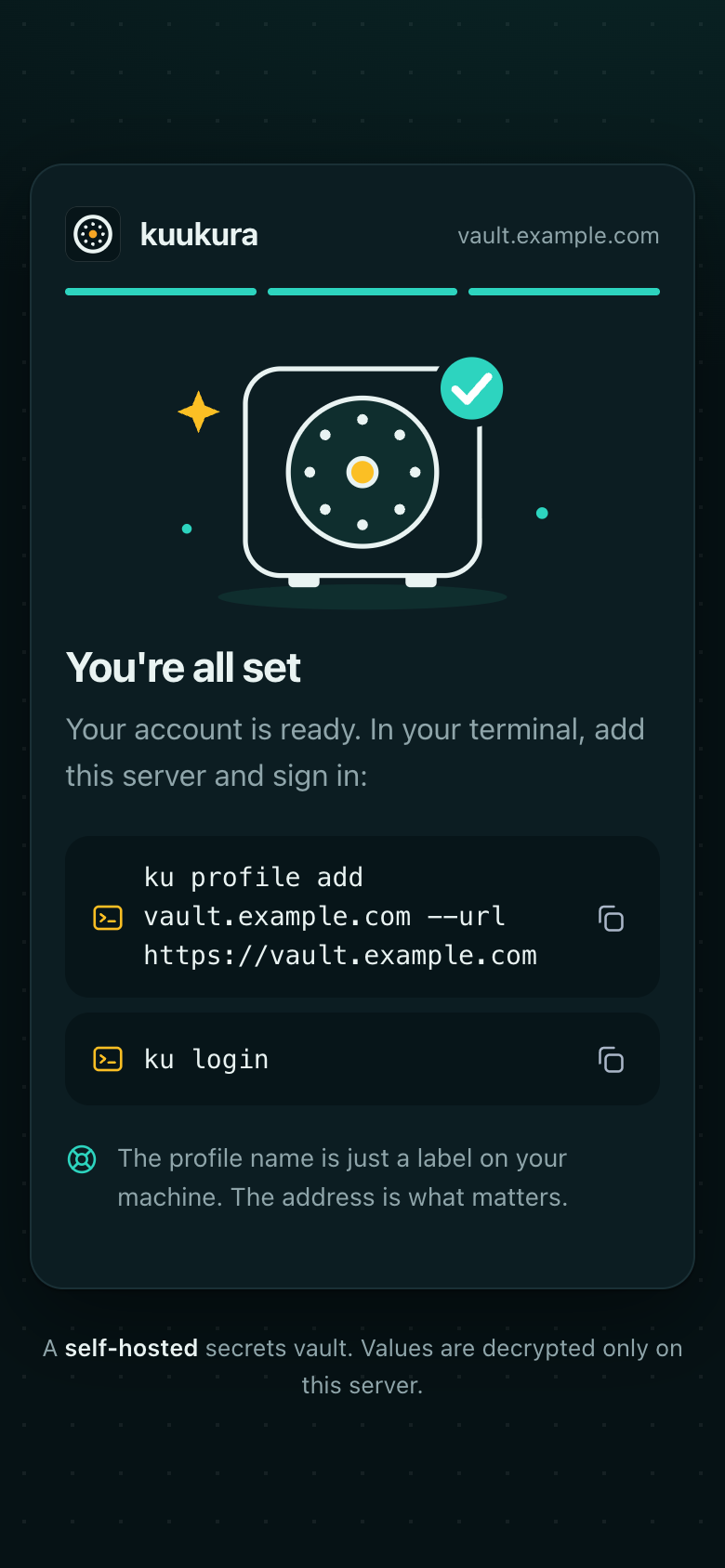
Point it at your server.
A profile is a name and the address of your vault. Nothing secret is stored in it.
Step 2
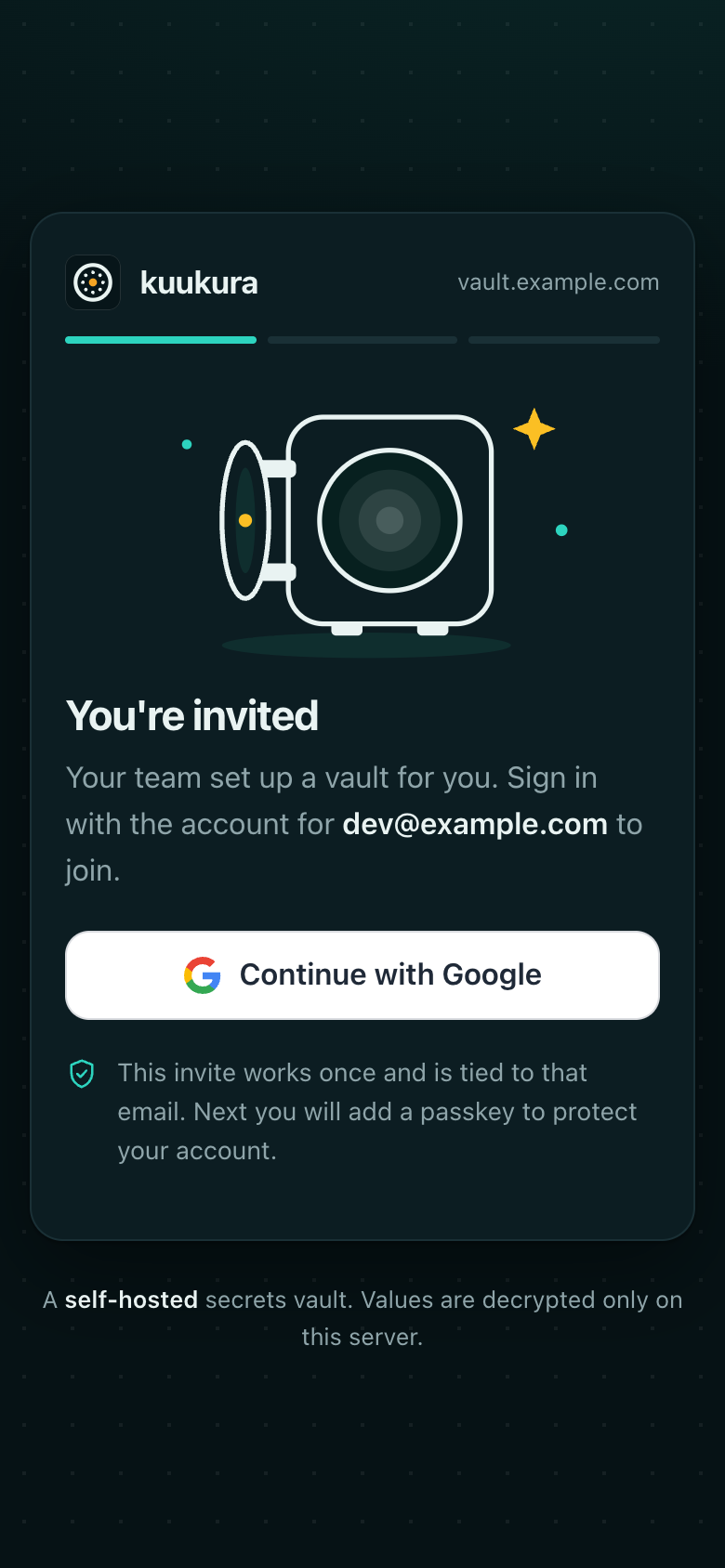
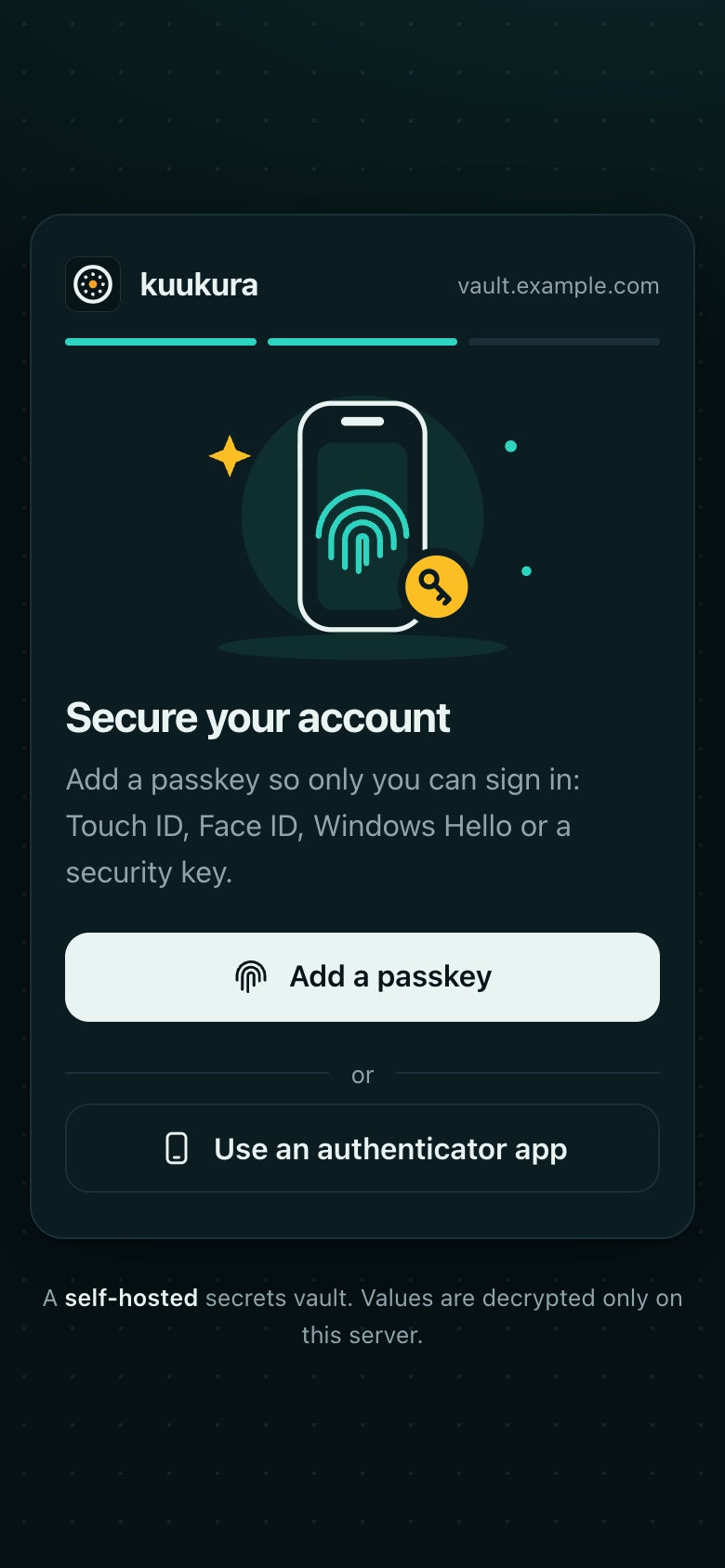
Sign in with Google, then your passkey.
A passkey or authenticator app is required on every sign-in. The session is kept in your system keychain for 8 hours, 1 hour idle.
Step 3
Save a value. Never as an argument.
It comes from a hidden prompt, so it stays out of your shell history and the process list. The server encrypts it under a fresh data key.
Step 4
Run your app with its secrets.
Link the folder to an app once. ku run starts your command with the secrets you may read in its environment, and passes its output and exit code through.
Deploy
Runs anywhere you run Docker.
One container and the published image. SQLite by default, Postgres when you want it. Nothing to compile.
# with the compose file, .env and a master key in place (see the guide):
docker compose up -d
docker compose exec kuukura /ku-server user invite you@example.com --admin
docker compose exec -it kuukura /ku-server key showThe confirmation moment
A reveal needs you. Not just your session.
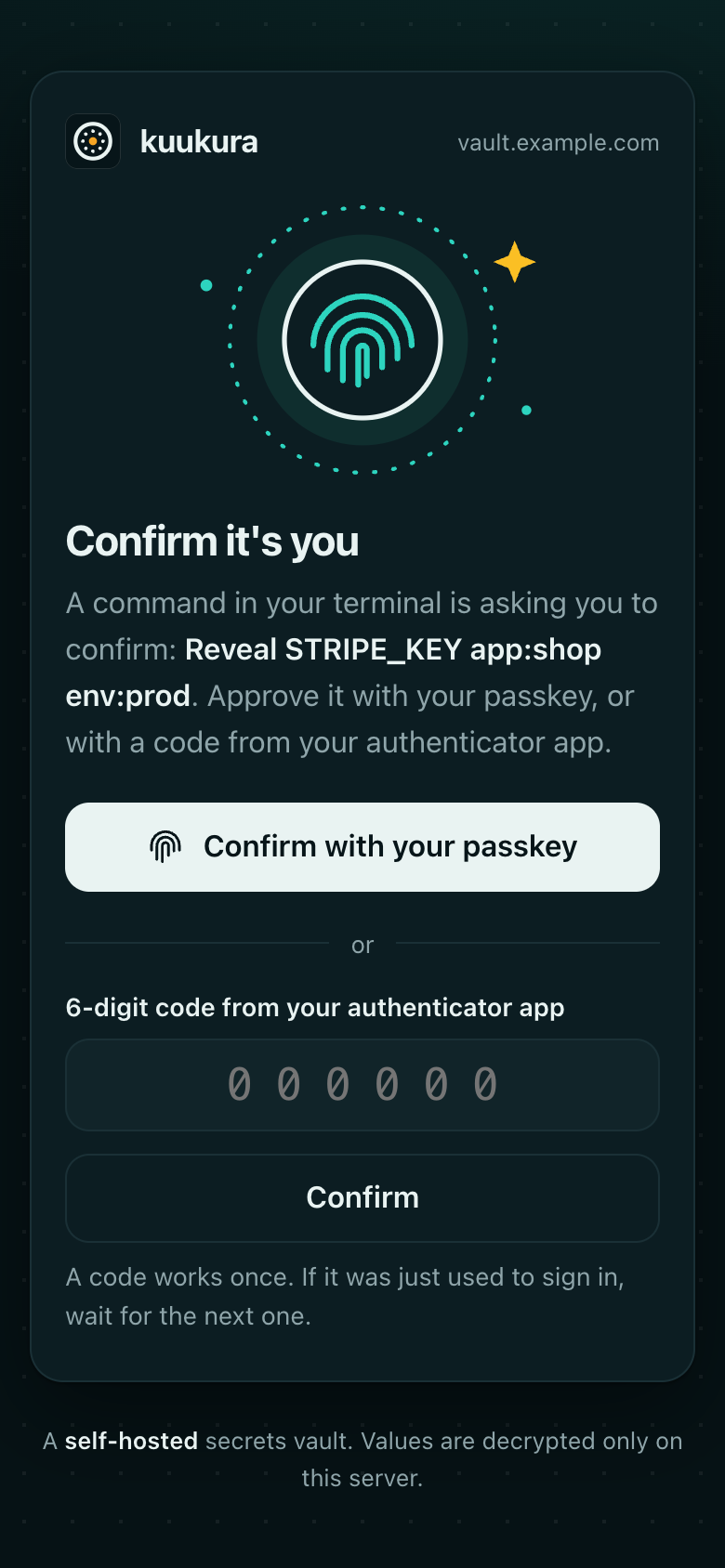
Revealing a value, saving it to a file or turning confirmation off opens a page on your own server. It shows exactly what you are confirming, then asks for your passkey or a code from your authenticator app.
What your team sees, from invite to done
- 1 The invitation
- 2 Add a passkey
- 3 Confirm
- 4 All set
How it works
The CLI is a channel.
The server holds the keys.
Your server checks the grant, decrypts, and writes the decision to the audit log. The database only ever holds ciphertext (the encrypted values) and wrapped keys: each secret version gets its own key, locked by your master key (envelope encryption).
Built for AI coding agents
Let agents use secrets without handing them over.
Add SKILL.md to your agent. It teaches ku run and ku secret list, and what
never to do: no reveals, no printing values, no values in commands or files.
Secrets live in a vault. You run commands with them; you never read them.
Do
ku secret list app:shop env:devnames, versions and tags, never valuesku run env:dev -- npm run devsecrets injected as env vars- If a secret is blocked or you are not permitted, stop and tell the user.
Never
ku secret get --revealor--out: they need the user’s own confirmation- Print, echo, log or paste a secret value anywhere.
- Put a value in a command line, a URL, a config file or a test fixture.
Security, honestly
Every claim comes with a place to check it.
Things you can verify, not take on trust. These are self-reviews and published evidence, not third-party certifications.
- Threats, controls and what is not defendedThreat model
- A self-review against OWASP ASVS Level 2 (a checklist of application-security requirements), with its open items listedASVS L2 self-review
- Nothing is readable by default, and admins have no secret access by roleGrants
- An audit log you can check: each entry carries a fingerprint of the one before it (hash-chained), so edits show
ku-server audit verify - Static analysis and dependency checks in CI (staticcheck, gosec, govulncheck)
ci.yml
v=YEAR.MONTH.N
gh attestation verify oci://ghcr.io/victorlunam/kuukura:$v --repo victorlunam/kuukura
cosign verify ghcr.io/victorlunam/kuukura:$v \
  --certificate-oidc-issuer https://token.actions.githubusercontent.com \
--certificate-identity https://github.com/victorlunam/kuukura/.github/workflows/release.yml@refs/tags/v$vWhat kuukura does not protect against
Agents that print what ku run injects are covered in the agent guide.
How it compares
Choose the right tool. Even if it isn’t this one.
| Tool | Hosting and license | Choose it if |
|---|---|---|
| kuukura | Self-hosted, one organization. MIT. | You are one small team and want a vault you can operate in an afternoon |
| Infisical | Self-hosted or cloud. MIT core, paid enterprise edition under ee. | You want a broader platform (dynamic secrets are among its features) and can use its enterprise tier where needed |
| OpenBao | Self-hosted. MPL-2.0. | You need dynamic credentials with leases and revocation, many backends or large-scale policy |
| SOPS | A file tool, no server. MPL-2.0. | Your secrets live in Git and you do not need access logs or per-person grants |
| .env files | None | Throwaway local work with nothing worth protecting |
Sources, last checked 2026-10-19: the repository pages linked above (licenses and feature lists as stated by each project). Open an issue if a row is out of date.
Open source
MIT licensed. One maintainer. No surprises.
MIT license
Free to use, read and change. There is no hosted version: you run it yourself.
LicenseCalendar versions
Releases are
ChangelogYEAR.MONTH.N. Pin one in production and read the notes before upgrading.Contributions welcome
Issues and pull requests are welcome. A short issue before a large change saves everyone time.
ContributingReport privately
Found a vulnerability? Use GitHub’s private vulnerability reporting, not a public issue.
Security policy
Not yet: a third-party security audit, and a requirement-by-requirement mapping to the ASVS checklist.
Questions
What does it cost?
Nothing. kuukura is free and MIT licensed, and there is no hosted version, so there is no subscription: you pay only for the server you run it on.
How do I back up?
Back up the database (the /data volume or Postgres) and the master key as two different things in two different places. Run ku-server key show once per key version and keep the text in a password manager; the key file lives in its own /keys volume.
Can an AI agent see values?
Not through the commands it is taught: ku run injects them, and reveals need your passkey or code. But a command it runs can print its own environment. Treat that as accepted risk and use low-value secrets (details).
What if I lose my passkey?
Use a recovery code (you get ten at enrollment). If you lost those too, someone with a shell on the server runs ku-server user reset-factors you@example.com and you enroll again through a 15-minute link.
What if the server is down?
ku run cannot fetch secrets until it is back, because values are decrypted only on the server. The server restarts by reading the key again; there is nothing to unseal. Run it as a restartable container with its volumes backed up.
Why not Vault or OpenBao?
They do more, including dynamic secrets (short-lived credentials generated on demand), and cost more to run. kuukura trades breadth for a small system you can understand and operate, with no unseal ceremony (the manual key entry some vaults need at every start). If you need their features, use them.
Can I use Postgres?
Yes: set VAULT_STORAGE=postgres. The audit log is insert-only, enforced with database grants (setup). SQLite is the default.
Free · MIT · runs on your server
A vault you can operate in an afternoon.
brew install victorlunam/tap/kuukuracurl -fsSL https://raw.githubusercontent.com/victorlunam/kuukura/main/scripts/install.sh | shirm https://raw.githubusercontent.com/victorlunam/kuukura/main/scripts/install.ps1 | iex